Get your free personalized podcast brief
We scan new podcasts and send you the top 5 insights daily.
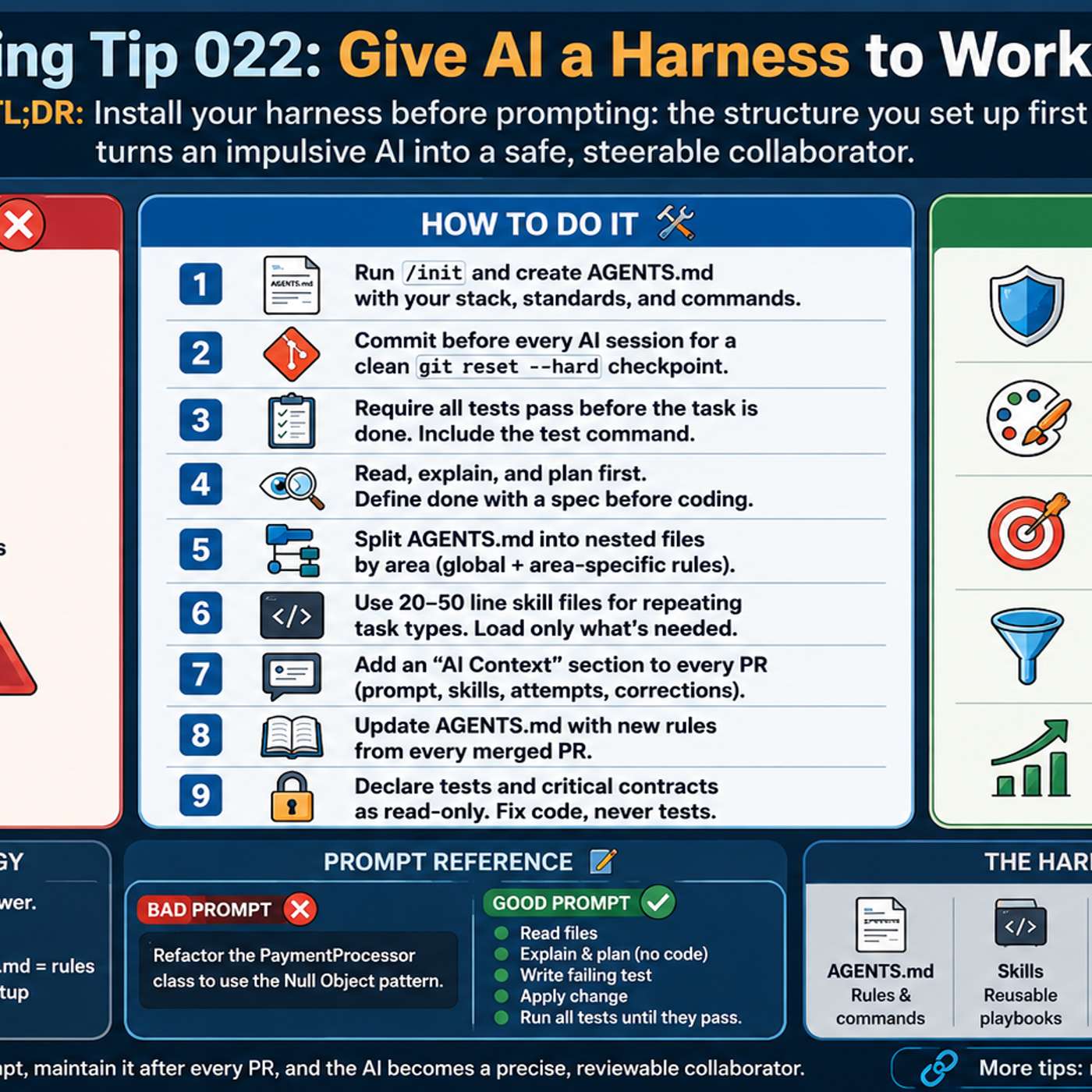
Implementing a comprehensive AI harness requires significant upfront investment. This setup is unnecessary for simple, low-risk tasks like fixing a typo or a minor CSS tweak. The key is to apply controls proportionally, using a full harness for complex changes while allowing simple prompts for minor fixes.
Related Insights
To decide if AI is appropriate for a task, apply a simple filter. The work should involve structure, repetition, and context. Crucially, it must also be a task where human oversight is still possible and beneficial. If these conditions aren't met, using an AI tool may be inefficient or risky.
High productivity isn't about using AI for everything. It's a disciplined workflow: breaking a task into sub-problems, using an LLM for high-leverage parts like scaffolding and tests, and reserving human focus for the core implementation. This avoids the sunk cost of forcing AI on unsuitable tasks.

A mental model for selecting AI tools based on two axes: the size of the task (from a small bug fix to a large new feature) and the amount of code that already exists in production. This framework helps designers decide when to use a prototyping tool versus a production-focused AI agent.
Separate AI's role. Use an AI assistant to write reliable, deterministic code for structuring data (e.g., pulling Slack messages via API). Then, apply a live AI model only for the subjective task, like categorizing message urgency. This hybrid approach creates a more robust and controllable system.

The choice between human-in-the-loop and full automation isn't binary; it's a maturity curve. Evaluate each AI use case using a rubric based on risk, the ability to reverse a decision without harm, and the reproducibility of its outcomes to determine the appropriate level of automation.

For complex, high-stakes tasks like booking executive guests, avoid full automation initially. Instead, implement a 'human in the loop' workflow where the AI handles research and suggestions, but requires human confirmation before executing key actions, building trust over time.
An effective Human-in-the-Loop (HITL) system isn't a one-size-fits-all "edit" button. It should be designed as a core differentiator for power users, like a Head of Research who wants deep control, while remaining optional for users like a Product Manager who prioritize speed.

Designing for AI is less about crafting pixel-perfect UIs in Figma and more about creating the underlying system or "harness." This involves enabling the agent to perform long-running tasks, verify its own work, and operate effectively within technical constraints, which is where the real design work lies.
Contrary to the goal of full automation, the most effective AI workflows intentionally preserve points of friction. These moments—where a human must intervene, check intent, or re-steer the process—are crucial for maintaining control and ensuring the output aligns with strategic goals, preventing the system from running unchecked in the wrong direction.

For complex, one-time tasks like a code migration, don't just ask AI to write a script. Instead, have it build a disposable tool—a "jig" or "command center”—that visualizes the process and guides you through each step. This provides more control and understanding than a black-box script.